
20% Of The Dark Web Taken Down By Hackers

20% Of The Dark Web Taken Down By Hackers

20% Of The Dark Web Taken Down By Hackers
Short Bytes: An alleged Anonymous hacker has taken down about a fifth of the Dark Web. He did so by breaching the servers of popular Dark Web hosting service Freedom Hosting II, which powers about 15-20% .onion sites. The hacker targeted the service as the websites contained a large collection of child porn. The vigilante hacker has also shared a simple 21-step hacking guide.
According to a media report, Freedom Hosting II, the largest dark web site hosting service has been hacked and taken down. The hack was performed by some alleged Anonymous-affiliated hackers. The hackers accessed the servers and stole 1000s of GB worth data.
The hacker, talking to Motherboard, told that the hack was a vigilante move. The visitors to 10,000 .onion websites read an announcement that said: “Hello, Freedom Hosting II, you have been hacked.” As per the estimates of an independent security researcher Sarah Jamie Lewis, the percentage of websites down account for about 15-20% websites on the Dark Web.


The hacker has called it his “first hack ever” and he just had the “right idea.” He initially compromised the service on January 30, but only got read access. Back then, he allegedly found heaps of child porn websites that were using more than Freedom Hosting II’s quota of 256MB per site.
The hacker says that he suspected that the website owners paid for the hosting, so, he decide to take down the websites.
The hacker has released the system files dump, but not the data of users. This is because it contained a large amount of child porn. He plans to pass it to some security researcher and law enforcement.

How the hacker took down a fifth of the Dark Web?

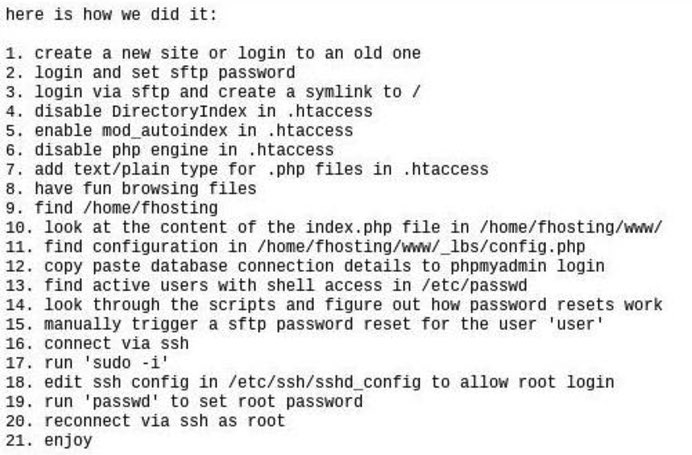
The hacker has also shared a simple 21 step process for taking down the Dark Web. The attacker needs to first create a new Freedom Hosting II site, or log into a current one. This needs to be followed by making some configuration changes, triggering password reset, grabbing root access, and so on.
Here’s the screenshot of the alleged method:how to take down dark web
Comments

Popular posts from this blog

WhatsApp Plus v5.20 MOD APK is Here!

WhatsApp Plus v5.20 MOD APK is Here! WhatsApp Plus v5.20 WhatsApp Plus v5.20 MOD Apk  WhatsApp Plus is a similar version of WhatsApp with a number of improved features inside. Basically, WhatsApp Plus is not an official app for any smartphone platform, the app is still available as a third party app. Although people find it quite impressive just because of the set of exciting new features in the app. WhatsApp Plus is a complete modified version of the current WhatsApp app, where you can customize your own emoticons and can change backgrounds and much more things within the app. The app is there just to make over the current WhatsApp application. Features of WhatsApp Plus Ban Proof Supports calls / Video calls Hide your ( last seen ) Privacy MODs Themes MODs Theme Server ( to download/apply themes ) Change ticks/bubbles Style Mod (17) Ticks & (13) Bubbles Styles to choose Counter statistics for groups Media preview without loading Show Online/last Seen in Main Screen Send video ...

Top 10 Best File Manager or File Explorer for Android Device

Top 10 Best File Manager or File Explorer for Android Device Android phones has some benefits over ISO or Windows phone , because it allows user to access their device as a mass storage device, but it won’t be much benefits if you don’t have right app to take advantage of this features . Every Android mobile and tablets has comes with a built-in file manager which is not very powerful and flexible, it allows user to do some basic task like Copy, Paste, Move, Rename, Delete etc. But the built-in android file manager does not allows user to do advance task that offered by third-party android file manager or file explorer for android. Top 10 Best File Manager or File Explorer for Android Device There are a lot of situations where you need to have a good file manager in your android device, for example if you want to change file extension on your android device or want to access your device’s system file even if you want to access whatsapp video and image folder on bluestacks...

Top 8 Best WhatsApp Tips And Tricks Of 2017

Top 8 Best WhatsApp Tips And Tricks Of 2017 M illions of people are using WhatsApp these days. It is as popular as Facebook, Twitter or Instagram. With millions of users, we can presume that most of the people at least use it once in a day. And everybody thinks that they know everything about WhatsApp. Maybe some of them do. But most of the people doesn’t, because technology won’t stop. There are always more tips and tricks which you can learn and use anytime. So that’s why today I am going to tell you about Top 8 Best And Cool WhatsApp Tips And Tricks which will definitely help you to become WhatsApp pro. So check out the Tricks in the description below. Top 8 Best WhatsApp Tips And Tricks Of 2017 1. Create Chat Shortcuts If you are chatting with 2 or 3 people at the same time on WhatsApp like with your girlfriend, wife, and with others, it won’t be easy to manage all those chats. So to make it easy, you can create conversation shortcuts to your home screen so that you don’t need to o...